Realtime
Recorded
Concepts
Guides
API Reference
Batch is the recorded-audio path of Lanson Live API: submit a public audio_url, process asynchronously, and receive complete results. It is another workflow for Lanson Live, not a separate model to select.
For synchronous client-VAD clips see Segment Transcription. For live streams see Realtime.
How it works
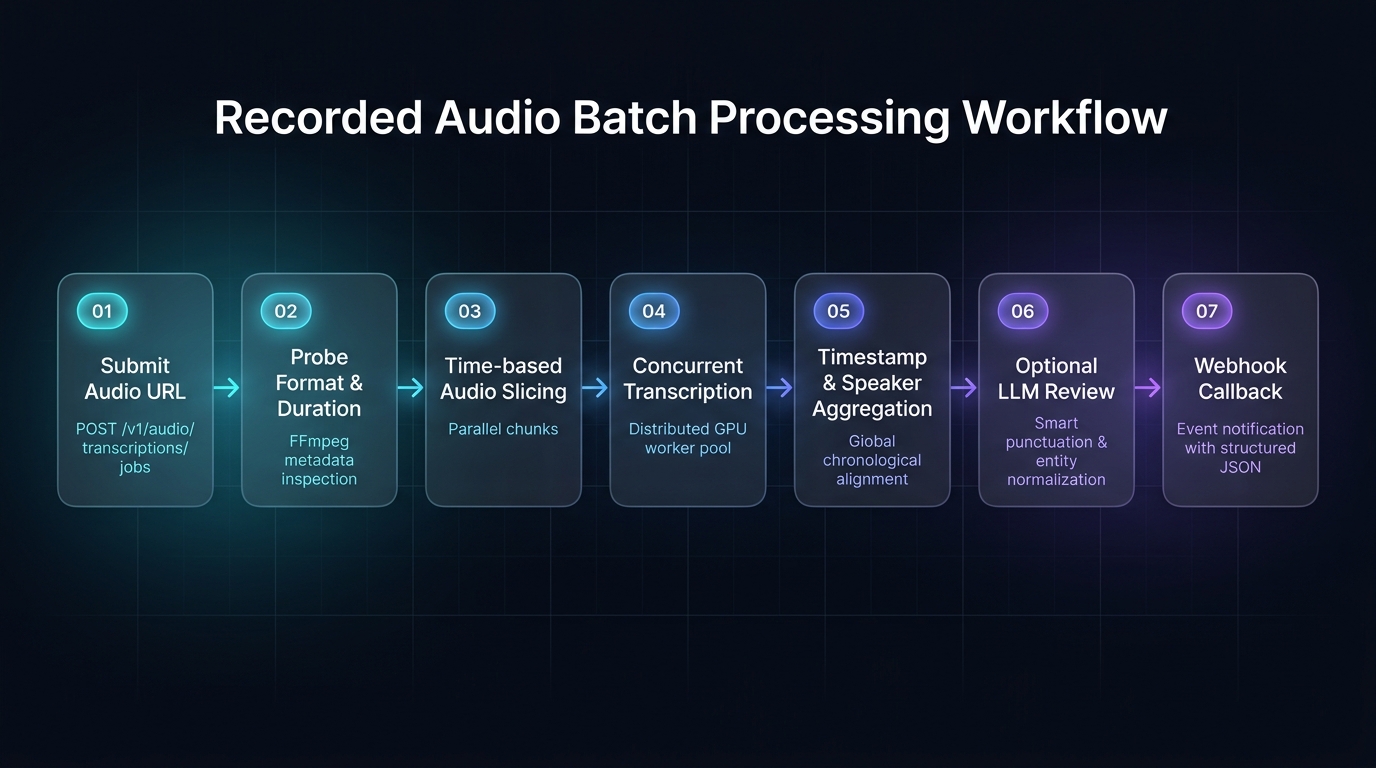
When to use
| Scenario | Suitable |
|---|---|
| Post-meeting processing | ✅ |
| Batch audio file transcription | ✅ |
| Need precise timestamps | ✅ |
| Need structured results | ✅ |
| Need subtitle files | ✅ (client-side from timestamps) |
| Short utterance after client VAD | ❌ use Segment |
| Live microphone stream | ❌ use Realtime |
vs. Realtime and Segment
| Dimension | Batch jobs | Segment HTTP | Realtime |
|---|---|---|---|
| Transport | HTTP async | HTTP sync | WebSocket |
| Input | Audio URL | Multipart file | PCM16LE stream |
| Latency | Minutes | ~≤2.4s | Milliseconds |
| Output | Complete JSON | Transcript JSON | Event stream |
| Segmentation | Server (time slice) | Client (VAD) | Server (VAD) |
| Success | 202 + poll | 200 | WS events |
Current capabilities
| Capability | Status |
|---|---|
| Full-file transcription | ✅ |
| Segment timestamps | ✅ |
| Confidence scores | ✅ (0 when upstream does not provide a value) |
| Translation | ✅ (per target language, frozen at job creation) |
| Webhook callback | ✅ |
| LLM review correction | ✅ (on by default; set review: false to opt out) |
| Speaker diarization | Coming soon |
| SRT/VTT subtitles | ✅ (client-side, generated from timestamps) |
Next steps
- Transcribe Audio — submit a job
- Batch Jobs API
- Segment API — client-VAD clips
- Timestamps & Speakers