Realtime is the live-streaming path of Lanson Live API, LansonAI's Voice Context Layer for Live Speech. Use Segment for client-cut clips or Batch for recordings.
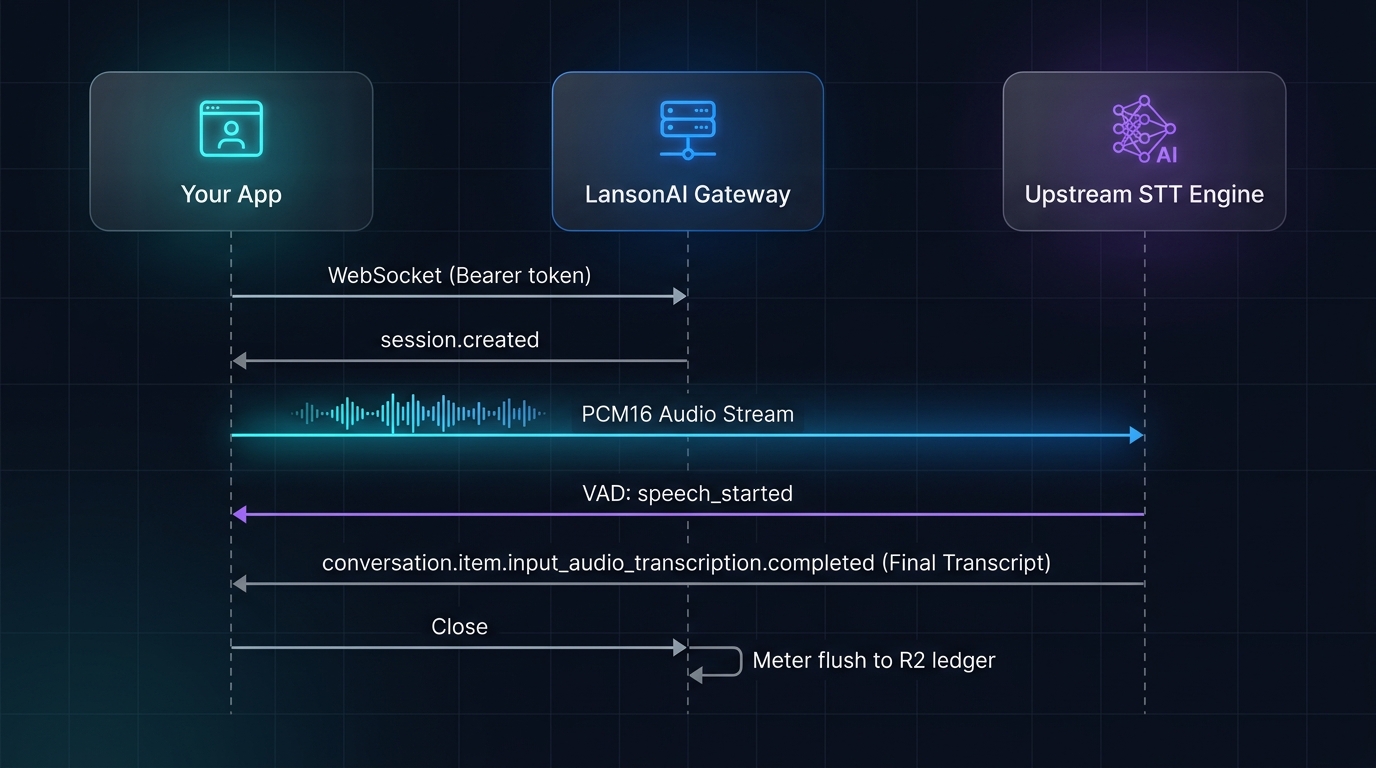
You send PCM16LE audio over WebSocket. Trinity Engine coordinates processing, and the API delivers stable, readable text through StableStream™ behavior. LiveFinal™ describes correction and segment finalization; see its current event boundaries.
What it does
- Live captions: text appears while the person is still speaking
- Real-time translation: source and translated text together, per target language
- Multi-language: Whisper-compatible language support
- Server-side VAD: automatic speech segment detection, no client-side splitting needed
Input
- Audio format: PCM16LE / 16kHz / mono
- Transport: JSON text frames (base64) — the supported transport today
- Frame size: recommended 100ms frames (~3200 bytes), max 1 MiB
Output
Server pushes JSON events. The primary output is:
conversation.item.input_audio_transcription.completed— a speech segment has been transcribed
Supporting events:
input_audio_buffer.speech_started/speech_stopped— speech segment boundariessession.created— connection establishedsession.updated— confirmed language and feature settingslive.translation.completed— a target-language result when translation is enablederror— error events
The current public endpoint emits one completed result per successfully processed utterance, not partial-text revisions. Optional refinement runs before that result is delivered. It is off by default; the default lite profile is included in the base transcription price, and pro is billed as the realtime refinement add-on. Confirm feature availability and configure it before sending audio.
Architecture
vs. Segment and Batch
Next steps
- Realtime Quickstart — runnable example
- Connection Lifecycle — connect, timeout, close
- Audio Input — audio format reference