Build a browser-based live caption interface using the LansonAI realtime API.
Architecture
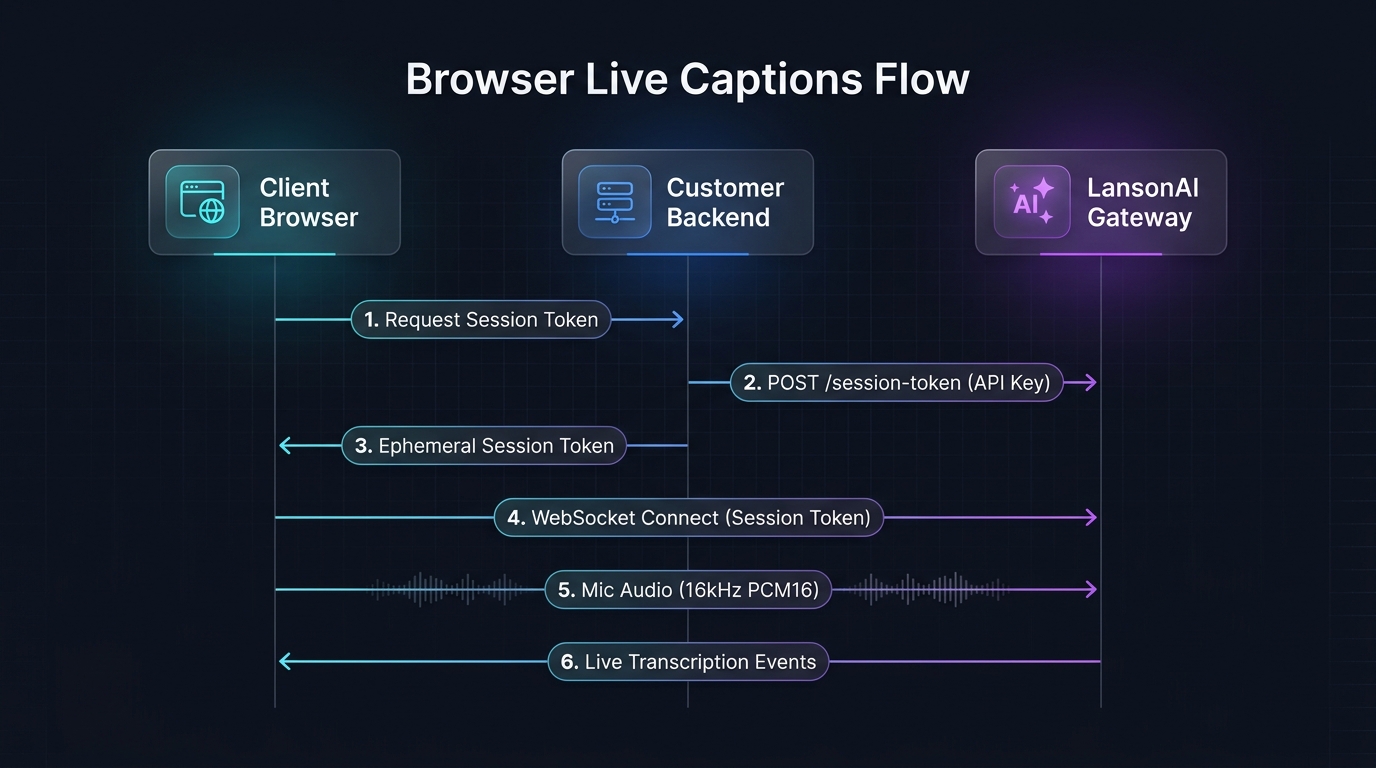
Step 1: Get a session token
Your backend exchanges the long-lived API key for a 60-second session token:
// backend route
app.post('/session-token', async (req, res) => {
const resp = await fetch('https://audio.lansonai.com/v1/audio/transcriptions/session-token', {
method: 'POST',
headers: { Authorization: `Bearer ${process.env.LANSON_AUDIO_API_KEY}` },
});
res.json(await resp.json());
});Never expose sk-... in frontend code. Always proxy through your backend.
Step 2: Open WebSocket
const { token } = await fetch('/session-token', { method: 'POST' }).then(r => r.json());
const ws = new WebSocket(
`wss://audio.lansonai.com/v1/audio/transcriptions/stream?access_token=${token}`
);
await new Promise((resolve) => { ws.onopen = resolve; });Passing language is recommended when you know it, because it improves accuracy. If you do not know it, omit it or send language: "auto" and the service auto-detects it. You can also call /v1/audio/language-detection first and pass the result. When the language changes mid-session, send "auto" again to re-detect; an explicit code always wins.
Step 3: Capture and send audio
// Convert an ArrayBuffer of PCM16LE to base64
function toBase64(buffer) {
const bytes = new Uint8Array(buffer);
let binary = '';
for (let i = 0; i < bytes.length; i++) binary += String.fromCharCode(bytes[i]);
return btoa(binary);
}
const audioContext = new AudioContext({ sampleRate: 16000 });
const stream = await navigator.mediaDevices.getUserMedia({ audio: true });
const source = audioContext.createMediaStreamSource(stream);
// Recommended: set the audio language before sending frames
ws.send(JSON.stringify({ type: 'session.update', language: 'en' }));
// Use AudioWorklet to get PCM16LE frames
await audioContext.audioWorklet.addModule('pcm-processor.js');
const node = new AudioWorkletNode(audioContext, 'pcm-processor');
source.connect(node);
// pcm-processor.js posts PCM16LE buffers to main thread
node.port.onmessage = (e) => {
// Send base64 JSON frames (binary frames are not transcribed today)
ws.send(JSON.stringify({
type: 'input_audio_buffer.append',
audio: toBase64(e.data),
}));
};Minimal pcm-processor.js:
class PcmProcessor extends AudioWorkletProcessor {
process(inputs) {
const input = inputs[0][0]; // mono, 16kHz
if (input) {
const pcm16 = new Int16Array(input.length);
for (let i = 0; i < input.length; i++) {
const s = Math.max(-1, Math.min(1, input[i]));
pcm16[i] = s < 0 ? s * 0x8000 : s * 0x7fff;
}
this.port.postMessage(pcm16.buffer);
}
return true;
}
}
registerProcessor('pcm-processor', PcmProcessor);Step 4: Display captions
ws.onmessage = (event) => {
const data = JSON.parse(event.data);
if (data.type === 'conversation.item.input_audio_transcription.completed') {
const div = document.getElementById('captions');
const p = document.createElement('p');
p.textContent = data.text;
div.appendChild(p);
}
};Browser security
- Never put
sk-...in frontend code - Always obtain
rt_...tokens from your backend - Tokens expire in 60 seconds — get a fresh one for each connection
- WebSocket
?access_tokenkeeps the long-lived key off the client
Related
- Build a Stable Caption UI — advanced UI patterns
- Authentication — session token details
- Realtime Quickstart — more examples