The full lifecycle of a realtime WebSocket connection.
Stages
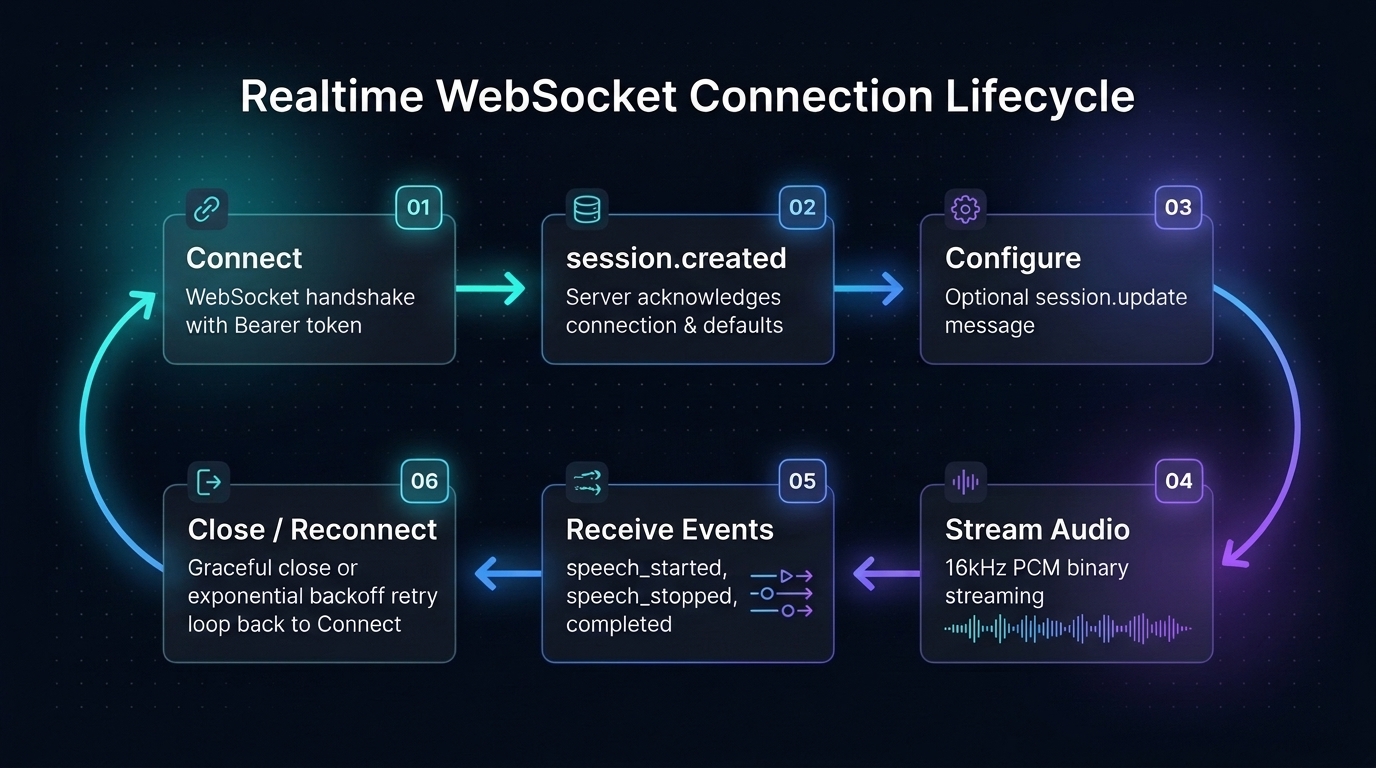
1. Connect
WebSocket handshake:
- Server-side:
Authorization: Bearer sk-...header - Browser:
?access_token=rt_...query parameter
Conditions checked on connect:
- WebSocket upgrade required (else 426)
- Gateway enabled (else 503
gateway_disabled) - Connection quota passes (concurrent + rate)
2. session.created
Received immediately on connect:
{
"type": "session.created",
"session_id": "sess_...",
"limits": {
"max_concurrent_utterances": 2,
"max_session_seconds": 900,
"idle_timeout_seconds": 60,
"remaining_audio_seconds": 3600
}
}3. Configure (optional)
Send session.update to set parameters:
{ "type": "session.update", "language": "zh" }The gateway applies the configuration and confirms it with session.updated. Configure optional refinement and translation before audio; see Session Configuration.
4. Stream audio
Continuously send PCM16LE audio frames:
- Text frames:
input_audio_buffer.append(base64 JSON) — the supported transport today - Binary frames: not transcribed by the public gateway today; use base64
- Speech boundaries: detected by server-side VAD as you continue sending audio, including natural pauses
5. Receive events
input_audio_buffer.speech_started— Voice Activity Detector detects speech onset.input_audio_buffer.speech_stopped— VAD detects silence or segment boundary.conversation.item.input_audio_transcription.completed— Final stable transcription payload emitted.
This cycle repeats for each speech segment.
6. Close / Reconnect
Normal close
Client calls ws.close() after receiving expected utterance results. Closing finalizes usage accounting, but is not a guarantee of pending transcript delivery or a session-wide final event. See LiveFinal™.
Timeout close
Idle timeout
To avoid idle timeout, either:
- Send silent frames to keep the connection alive
- Or close explicitly and reconnect when needed
Recommended reconnect design
- Listen for
closeevents, decide reconnect based on close code - 4408 (idle) and 1008 (duration limit): reconnect directly
- 1000 (normal): do not reconnect
- After reconnect, re-send
session.updateto restore configuration
See Reconnect a Live Session for a detailed guide.
Related
- Realtime API — endpoint reference
- Reconnection & Retries — retry strategies
- Rate Limits — plan timeout parameters